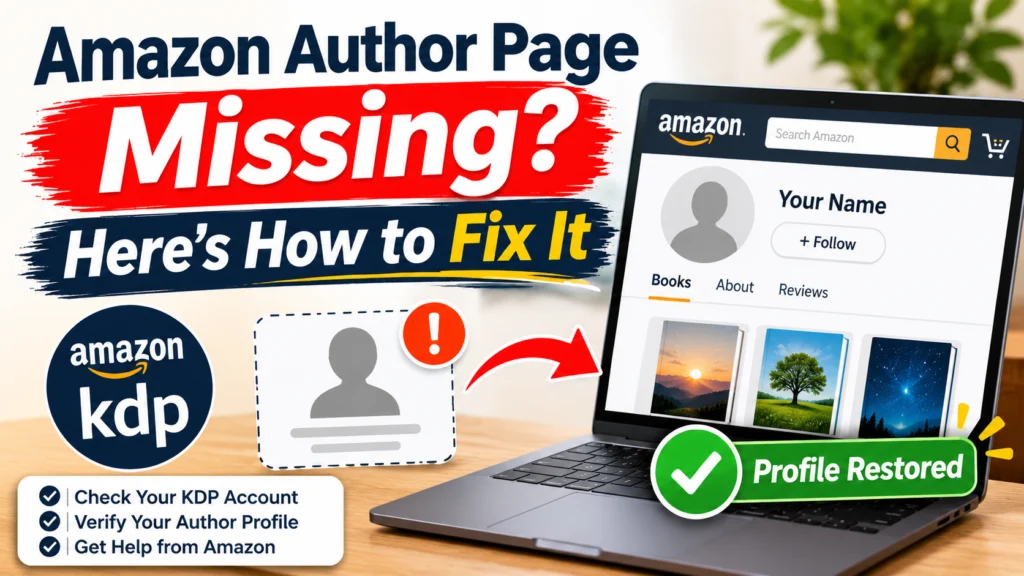
You hit publish, searched your own name on Amazon, and found nothing. Or your page does exist, but one book isn’t on it.
These look like the same problem. They aren’t, and fixing the wrong one can make things messier. So start by figuring out which one you have.
If you’ve never set up Author Central at all, go to our Author Central setup guide first. This article is for when something’s already gone wrong.
Which problem do you have?
| What you see | Most likely cause | Go to |
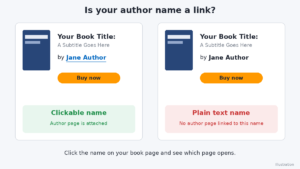
| Your name under the book title is plain text, not a link | Page never created or claimed | Situation 1 |
| Your page exists, but a book is missing | Book not linked to your profile | Situation 2 |
| Book is on Amazon, but Author Central search finds nothing | Listing not fully live, or wrong search term | Situation 3 |
| Your name opens someone else’s page, or editions are split | Name mismatch between editions | Situation 4 |
| You saved changes, but the public page looks the same | Update pending, or wrong store | Situation 5 |
Three quick checks first
These take five minutes and often solve it outright.
Is the book really live? Open the actual detail page, not a preview. You should see the cover, a price and a buy button. If your KDP Bookshelf says “In Review” or “Draft,” Author Central can’t see the book yet, and nothing below will help until it goes live.
Is your name spelled the way you think it is? Look under the title and check the spelling, middle initial and spacing. Write down exactly what you see, because you’ll need to match it later.
Is your name clickable? If it’s plain text, no author page is attached to that name. If it’s a link, click it and see whose page opens.
Also make sure you’re signed in to Author Central with the same Amazon account you use for KDP. An old or second account is one of the most common reasons authors think their page has vanished.
Page missing vs. book missing
Page missing means no profile exists, or you never claimed it. You need to create it by claiming at least one live book.
Book missing means the profile exists but a title isn’t attached. You need to claim that specific book, and usually each edition (Kindle, paperback, hardcover, audiobook) separately.
Don’t try to fix a missing book by starting a new page. That’s how people end up with two half-empty profiles.
Situation 1: You haven’t created your author page yet
If your name isn’t a link and Author Central shows no books, this is you.
Publishing on KDP doesn’t create an author page for you. It’s a separate step, and a lot of first-time authors miss it. I’d guess it’s the single most common cause.
- Sign in to Author Central with your KDP/Amazon account.
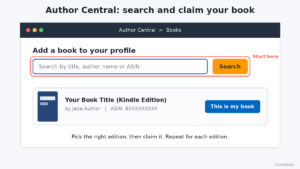
- Search for your book by title, name or ASIN.
- Pick the right edition and claim it.
- Open the Profile tab and add your bio and photo.
Can’t find or claim any live book after trying title, ASIN and name? Contact Author Central support.
Situation 2: Your page exists, but a book isn’t on it
Amazon doesn’t always add new titles automatically, and editions are handled one by one. It’s quite normal to have the paperback linked and the Kindle edition missing.
- Go to the Books tab in Author Central.
- Add a book, and search by ASIN or ISBN, not the title.
- Claim every edition you want on your page.
- Go back to the Books tab and check that each one shows up.
If Author Central won’t let you claim your own book, or says it belongs to another profile, write to Author Central support. Include the ASIN and your exact author name.
Situation 3: The book is live, but Author Central can’t find it
Customers can buy it, yet your search comes back empty. Here’s what to try, in order:
- Confirm the cover, price and buy button are all showing.
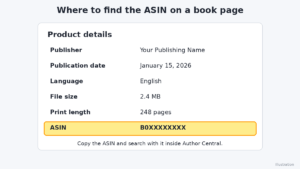
- Copy the ASIN from the product details section and search with that.
- Check you’re in the right Amazon store. Profiles are managed per marketplace, so a book live in one store may not have reached another yet.
- Drop any subtitle or series text from your search.
- If the book is brand new, wait a bit and try again instead of resubmitting.
Which team to contact depends on the symptom:
- Book not live, or a status problem in your Bookshelf: KDP support.
- Book live, ASIN correct, still not found after waiting: Author Central support.
Situation 4: Your name doesn’t match across editions
Amazon links books to author pages by the name attached to each edition. To a human, “John Smith,” “John A. Smith” and “J. Smith” are one person. To Amazon, they can look like three.
- Compare the author name on every edition’s detail page, letter by letter.
- In KDP, check the contributor name in each edition’s details.
- If they differ, change them to match and resubmit. Expect a review before it goes live.
- Once the names match, go back to Author Central and claim the editions.
Think carefully before changing a name on a live book. Pick the version you want to use for the long haul, since it affects how readers find you.
If the name is wrong in the book’s metadata, go to KDP support. If the names are right but your books still sit on the wrong profile, or on someone else’s page, go to Author Central support.
Situation 5: You saved an update, but it isn’t showing
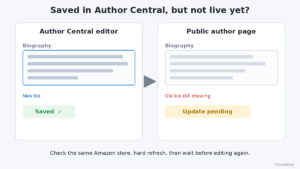
You changed your bio or photo, hit save, and the public page still shows the old version.
- Reopen the section in Author Central and make sure the change actually saved.
- Check the right marketplace. A change in one store may not show in another.
- Hard refresh, or open the page in a private window, to rule out caching.
- Check your bio and photo against Amazon’s content guidelines. Content that doesn’t comply can be held back.
- Wait before editing again. Resubmitting over and over makes it harder to tell what’s still pending.
I’m not giving a processing time here on purpose. Amazon only says updates take time, and the official Author Central Help pages are the place to check current wording.
If nothing has changed after a reasonable wait, contact Author Central support and tell them what you edited and when.
Who should you contact?
| Contact | When |
| KDP support | The book isn’t live, your publishing status is stuck, or the title or author name is wrong on the listing |
| Author Central support | You can’t claim a book, a book is on the wrong profile, your profile won’t update, or you can’t get into your account |
Either way, include your author name exactly as it should appear, the ASIN or ISBN, the Amazon store involved, and a short note on what you’ve already tried. A clear message gets a faster answer.